
Debut Video Capture for Free Screen Recording
Debut Video Capture is a program that lets you record real-time image sources from a Windows PC, as well as screens or images from a USB video device, and save them as a video file. The recording can be from a digital video camera or a webcam as well. Debut Video Capture by NCH is simple to use. Moreover, it is also Windows 11 compatible.
Top Recommended Alternative
How does one use Debut Video Capture?
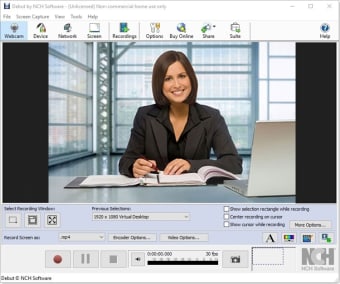
Debut Video Capture is easy to use and has a fairly intuitive interface. The program captures videos from a number of internal and external sources. The dark mode interface shows a top panel and lists the sources from where you can capture videos. These are Webcam, Device, Network, Screen, and Camera Overlay. The top panel also shows where you can review recordings and other options. From the screen, you can even choose to capture only a customized section or from the entire selection.
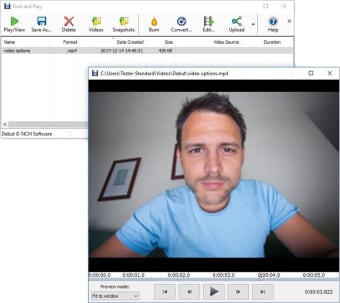
Once you have selected the source, you put a camera overlay, so the screen and webcam video can record at once simultaneously. To record, the 3 buttons are clearly laid out: Record, Pause, and Stop. Once the recording finishes, the device converts the video into an .avi format (as default), and can replay it as well.
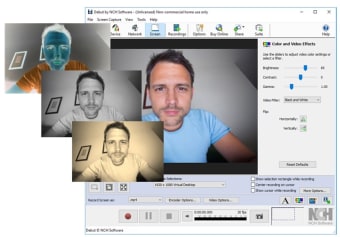
There is the option of adding effects or adjusting the video in terms of color, contrast, hues, etc. There is also an option to add text to the video and adjust the watermark. You can easily select or crop the recording window, making it customizable at any moment.
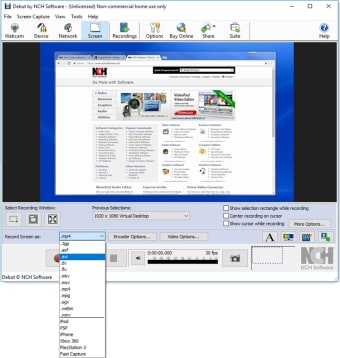
You can record the screen in a number of configurations depending on the device or source. It can be done in dimensions found of Android, iPhone, PS4, or Xbox devices. There is also a fast capture option, which can capture from standard default dimensions.
You can also adjust the camera overlay according to the preferences, as well as the input device from the internal webcam to an external video source. There is also the possibility to modify camera and microphone settings and adjust the volume and alignment.
What is the purpose of Debut Video Capture Good?
The program is excellent for tutorial videos, so you can talk on video while displaying a concept in real-time. Demonstrations and remote presentations would also work well with this program.You can easily and directly share the video to Linkedin, Facebook, and Twitter.
Also, the program does a great job in trying to capture processes, meaning you can conduct a series of tasks, and record the process to be able to replicate it later.
Some alternatives to the program include Camstudio, ezvid, Hypercam, Jing, etc.
What are the advantages of Debut Video Capture?
Debut Video Capture by NCH is free software. You can download it unlicensed. It is easy to use, and no prior video recording experience is necessary. You just connect to a network, so other devices can connect to the program. Once devices have been selected and the screen portion decided, the actual recording is fairly simple: record, pause, and stop are all the actions you'll need to know. .
The videos and the capture region are highly customizable. The program is excellent for recording a demo, presentation, or tutorial. The fact that you can also have a video camera overlay adds to the product even more. You just simply record and share to Linkedin, Facebook, or Twitter directly from the program, or save the recording as an Avi file on the local drive/external storage device.
What are the disadvantages of Debut Video Capture?
When you open the program, it is rather intimidating at first glance. It takes a bit getting used to in order to start using it. The interface is intuitive, but perhaps there are too many options on the screen at the same time, and that can appear confusing. Once the user tries it once or twice, more features are uncovered. For someone totally new, it may be a challenge to navigate through the program.
There is no live streaming capability. You need to save the entire video, then share it separately on YouTube or any other streaming platform. This could perhaps have been much more useful than linking the Share function to social media channels only.
What’s the final verdict?
Debut Video Capture is a great program that goes beyond the screen capture software. It is an innovative and easy way to capture the image or the screen and record with or without a camera overlay. For demos, tutorials, presentations or remote instructions, this title is ideal.
The interface is intuitive, and while it may be overwhelming at first, you'll find yourself knowing how to manage each function correctly. A drawback of the program, however, is its lack of live streaming capability to Youtube or any other online video platforms. Also, for those interested in using the program for commercial purposes, a pro version of this title will be necessary. .








.png)